
One of the greatest products of modern technology, video
conferencing has changed the way people communicate. What used to
be but a concept of science fiction has become a reality in the
modern world. Just about everyone uses the technology, especially
those who need to talk to people in far away places. the following
section will seek to provide a definition of video
conferencing software[1].
But what is video conferencing software? It is a tool that
is capable of letting two parties communicate via video and audio,
all you need is an Internet connection. How does video conferencing
software work? It basically enables two or more parties to initiate
and conduct live conferences by transmitting audio, video and text.
As such technology has been around for some time now, it has grown
in popularity not only among individuals but businesses as well.
This essentially provides us with a definition of video conference
software.
Video conferencing tools have been known to help companies
connect with their partners and employees around the world,
resulting in increased productivity and lower communication costs.
In addition, most video conferencing platforms enable users not
only to communicate but also collaborate.
For video conferences with multiple participants, users
are allowed to sit side by side in a virtual conference room and
communicate. Video conferencing software has become a staple in the
business world, accessible both by computers and mobile devices.
Cloud-based virtual meeting places have also been established,
allowing companies to use video conferencing without investing on
too much hardware.
Businesses benefit from the use of video conferencing
tools not only in terms of costs associated with staff training.
Project times are also reduced owing to better communication among
members of corporate teams. It also fosters better relationships
with relevant contacts as well as customers. For individuals, such
software can help them become more familiar with persons they may
never even meet.

Source:
searchunifiedcommunications.techtarget.com
With the benefits that video conferencing software offer
organizations, it’s not surprising that many companies have been
adopting the tool. It is primarily used for communication with both
domestic and international suppliers and customers. Proof of the
software’s increased popularity is the fact that the global
market for video conferencing software[2]
is forecast to expand by a CAGR of 8% from the year 2015 through
2022 and reach a staggering $7.76 billion. Such growth is seen to
be driven by the use of cloud technology, which has enabled
companies to use the software at minimal cost. The development of
new innovations in video conferencing[3] will also fuel this
growth.
In this
guide, we will discuss pertinent information that will help you
better understand what is video conferencing software. The
following will be discussed and covered in detail.
- Types of Video Conferencing
Software[4] - Benefits of Video
Conferencing Software[5] - Features of Video
Conferencing Software[6] - Examples of Video
Conferencing Software[7] - Things to Consider When
Buying Video Conferencing Software[8] - How Much Does Video
Conferencing Software Cost?[9] - Potential Issues with Video
Conferencing Software[10] - Trends in Video
Conferencing Software[11]
Types of Video Conferencing
When it comes to video conferencing, there are a variety
of options available, depending on the purpose of using tool. Here
are some of them:
- Telepresence Video Conferencing
System. A commonly used video conferencing
method, telepresence video conferencing involves technologies that
allow participants to feel as if they are truly present and gives
the impression of being at a remote physical location. In this type
of video conferencing, phone and network connections are used, with
monitors and cameras positioned over conference tables, giving the
illusion of actually sitting in the room with participants. Albeit
the technology is expensive it provides a high-quality and richer
video conferencing experience. - Room-based Video Conferencing
System. Room-based video conferencing is also a
common method being employed by businesses. It is essentially a
software-based video conferencing type. It employs video
conferencing endpoints, multiple control unit and an Internet
connection. It likewise requires video conferencing equipment and
provides high-quality calls. - Desktop Video Conferencing. Perhaps
the most popular form of video conferencing, desktop video
conferencing is known for being easy to use and very affordable.
You need only to download and install a video conferencing app and
you’re ready to go. It allows anybody to host a video conference
from the comfort of their desktops. However, you must have a
reliable Internet connection, a webcam, a microphone and loud
speakers to make sure you get high quality calls.
This type of video conferencing is not confined to desktops.
You can also make and receive calls from mobile devices, which come
equipped with cameras, microphones and speakers. They are also
capable of holding video conferences from virtually
anywhere.
This are but some of the most common types of
video conferencing. They have their own strengths and weaknesses.
It’s up to you to choose which one suits your needs.

GoToMeeting: Web conferencing tool for
international users
Benefits of Video Conferencing Software
So why use video conferencing software? Such tools have a lot to
offer your organization, ranging from cost reduction to improved
productivity. However, its up to you to explore and exploit all the
potentials of video conferencing tools. A myriad of benefits await
your organization from using such platforms. Here are some of the
advantages of video conferencing software:
- Lower Travel Costs. Being able to
meet and talk to people in different locations from the comfort of
your desk is among the key goals of video conferencing tools. It is
the closest thing to being in the company of your partners,
customers and co-workers. The costs associated with travelling to
business conferences have always been high. This is why video
conferencing has sparked the interest of many businesses.
Considering the expenditures that come with travel, one is bound to
choose video conferencing over live meetings any day. - Increased
Productivity. Conventional methods of
communication such as email, phone calls and instant messages could
entail misunderstanding, especially for businesses who run on a
global scale as they lack face-to-face communication. The use of
video conferencing is known to help staff stay focused, resulting
in faster project completion and increased productivity.
Participants are also always on the same page, along with vital
communication that you want them to understand. - Better communication and
relationships. Video conferencing can
significantly improve collaboration as participants can see one
another’s facial expressions and body language, essential factors
that commonly get lost during phone calls. The technology can help
staff in remote locations feel closer to home as corporate
officials are able to hold meetings in real time. It can also
facilitate meetings with suppliers, which can greatly help in
boosting production. - Edge over the competition. Video
conferencing can be a boon for product development teams seeking to
bring fresh ideas into the market. The use of video conferencing
tools helps share knowledge more quickly, making informed staff out
of team members. It can likewise benefit customer support as the
tool can help representatives create relationships with customers,
unlike phone calls which cannot foster loyalty. - Telecommuting made easy. Video
conferencing tools are also very useful for home-based workers. It
is capable of promoting interaction among telecommuting workers and
addresses the problems of adequate and understandable instruction
and upward reporting.
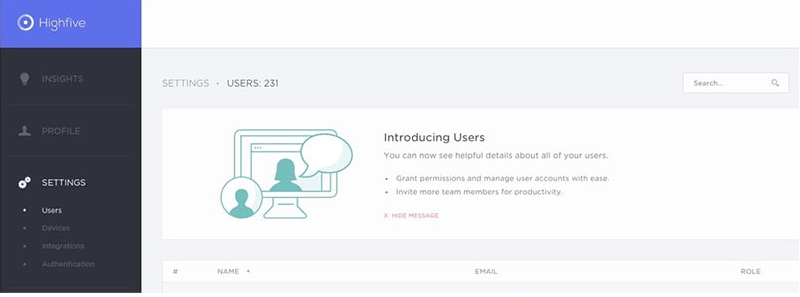
HighFive:video conferencing tool and
hardware provider
Features of Video Conferencing Software
What does video conferencing software do? It is known to
have a myriad of features that if used properly can result in a
rich video conference experience. More and more functionalities are
in the pipeline, with software vendors coming up with new and
better functionalities everyday. Here are some of the tool’s basic
features:
- Electronic whiteboards. This
feature enables conference participants to type or draw on the
board and even upload an image or document. Some apps even have the
capability to host more pages, which participants can easily
access. One can likewise highlight or draw circles on specific
areas of images, enabling him or her to drive home a point.
Additional functionalities such as zoom control, pointers and shape
makers may be present. - Application sharing. Any platform
that promotes collaboration should never be without an application
sharing feature and video conferencing software is no exception. It
basically enables multiple participants to interact using a program
running on a single machine. With this feature, other participants
are able to view files even if they do not have the software needed
to open such files in their computer. Application sharing boosts
collaboration among staff in the same manner as face-to-face
communication does. - File transfer. A tool that has been
in use for collaboration for a long time, file transfer software
enables users to send files to any video conference participant.
All that is required is an FTP server and FTP clients. The server
lets clients connect and request needed files. As most video
conferencing solutions have both client and server, the need for a
separate FTP server is eliminated. However, you should be careful
in using such tool as file transfers involve significant
risk. - Chat software. A typical component
of most video conferencing tools, chat software is meant to
function as an alternative communication channel in case bandwidth
limitations hinder video and audio calls. It is also meant to give
participants a secure environment in which to communicate. As most
chat sessions are restricted to only two participants, security is
assured for both parties. What’s more is that you can save chat
logs for future use.
Examples of Video Conferencing Software
There are a lot of solutions out in the market today, each has
its own set of features that can benefit your company. Here are
examples of video conferencing software:
- Skype. Web-based video conferencing
solution Skype offers
functionalities such as video chat, international calls and Instant
messaging. Deemed as among the best VoIP tools in the world, Skype
also offers features that foster collaboration, which include
document and image sharing. It is also capable of connecting to
landlines and mobile devices at very low rates.
[12] The application
is offered for free but a paid plan offers much more
functionalities like business conferencing that can accommodate up
to 250 participants, MS Office compatibility and third-party app
integration. It also takes security seriously, employing top of the
line authentication and encryption technologies.
While Skype remains as one of the most popular software of
its kind due to its pricing flexibility, it also excels as a
business communication solution and an inexpensive one at that.
This is why Skype easily beats the competition in being the most
preferred video conferencing software in the market.
Skype’s basic form is available for free. If you want more
functionalities, you can choose from a variety of pricing plans
starting at $2/month. - Zoom. Created specifically for
webinar hosting, online teaching and training, video demos and
video conferences, Zoom is an online video
conferencing and meeting solution that is easy to use. It combines
online meetings, video conferencing and meeting tools in a single
cloud-based software. It is very beneficial to small to medium
businesses, healthcare organizations and educational
institutions.
[13] Zoom is capable
of hosting meetings that can accommodate up to 100 participants,
including 10,000 viewers. It offers quality audio, video and screen
sharing features while fostering collaboration among teams and
employees in far off places. Its content sharing feature further
boosts access to web conferences and webinars.
Zoom’s basic version comes for free but if you require more
features and functionalities, it has a number of pricing plans
starting at $14.99/month. - Cisco WebEx. A robust audio and
video conferencing platform, Cisco WebEx is targeted
at businesses of all sizes and combines data, voice and video
capabilities in a single solution. It is highly-useful in
undertakings like product launches and educational sessions. With
the product, you can improve group collaboration and brainstorming
activities. It is a stable solution that also works perfectly with
different productivity tools.
[14] Scheduling
a video conference is a breeze with CiscoWebEx, all you need to do
is prepare an invitation on Microsoft Outlook and the software does
the rest for you. Attendees can be invited through email and can
join conferences via phone, computer or video systems. They can
also access meetings, becoming active participants in the process.
The tool improves collaboration with its Training Center, which
automatically assigns screen view, with the tool of choice readily
accessible.
CiscoWebEx is available in different
pricing plans starting at $24/month. - GoToMeeting. A simple and
easy-to-use web conferencing software, GoToMeeting is loaded
with international features, making it highly-suitable for
businesses that have foreign operations and professionals who deal
with multinational clients. Its interface is user-friendly, able to
initiate meetings in seconds. GoToMeeting is very flexible and can
seamlessly integrate with different third-party applications,
including Podio, Slack, Microsoft Office 365, among many
others.
[15]
GoToMeeting is ideal for use by businesses who need more than
the average video conferencing tool as it is built for heavy use.
It can run on any device running on Windows, Mac and Android,
enabling users to join meetings from any device anytime, anywhere.
In the tradition of most Citrix products, the platform enjoys great
customer support, which include live training, live chat and PDF
guides.
GoToMeeting has a free version and is
available in different pricing plans starting at
$19/month. - HighFive. Popular video
conferencing platform, HighFive is known for
making online meetings and video conferencing easier. The business
is ideal for use by businesses that have customers in different
cities or countries. Having removed common issues in video
conferencing tools, the solution has revolutionized the way online
meetings and conferences are made.
[16] The platform
boasts of serving more than 2000 companies, providing not only
software but managing audio and video hardware as well. The vendor
markets different conference room hardware designs, which is known
to appeal to a lot of users. With High Five, you need not invest in
additional hardware, resulting in huge cost savings. Setup is a
breeze, taking just minutes. It is likewise easy to use, taking
only a few clicks to initiate a video conference or an online
meeting. The software supports just about any mobile device out
there.
High Five is available in different pricing plans, starting
at $99/month. If you want to give it a try first, a free trial is
also available.
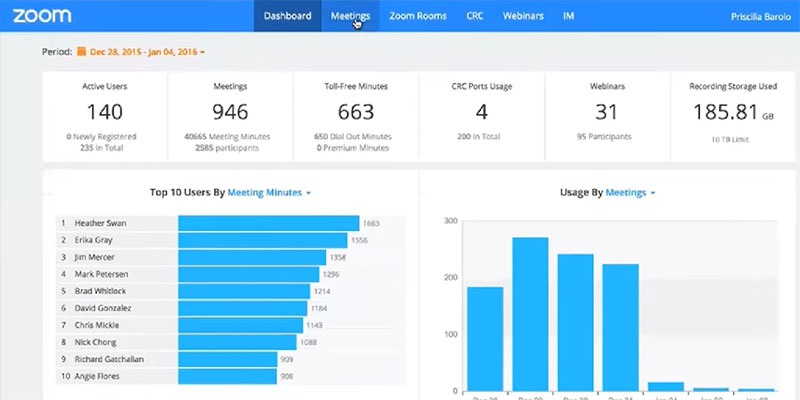
Online video conferencing and meeting
solution
Things to Consider in Purchasing Video
Conferencing Software
As video conferencing solutions vary in their
functionalities and pricing, there are a number of factors that one
should consider before committing to one. Here are some of
them:
- Vendor/Service
Provider. Businesses’ needs differ and finding
the suitable manufacturer could spell success or failure in
investing in such solution. What exactly does your business need?
Would it require high definition or conventional viewing limits?
How many users will there be? And what is the goal for using the
product? These questions and more should be asked before procuring
a video conference tool. To ensure that the purpose of video
conferencing software is fulfilled, you should go for free trials
that most vendors offer, which will enable you to determine if the
software suits you. - Integrations. You need to have
prior knowledge of whether a platform can run smoothly with your
existing architecture. A solution’s integration with your existing
system will surely result in smooth operation. You should know a
prospective solution’s technical requirements, that will allow it
to seamlessly integrate with your devices, which include UC
platforms, phone equipment and directory services. - Features. While most video
conferencing tools share common basic features, you should still
take time to research what functionalities a tool has to offer and
how they can help your company. It will also give you a heads up if
additional hardware and equipment are needed as some solutions
require them to implement certain capabilities that are not native
to their product. - Return-on-Investment. One area that
you should look into in a video conferencing solution is its
features and functionalities. This is important because a tool’s
features can significantly impact costs and subsequently sales and
revenue. This is why you should only invest in one whose features
suit your organization’s needs and goals. Remember that many
solutions’ costs do not stop when you purchase the product, it may
come with additional hardware that could have you investing more
than what you planned. - Employee participation. You should
consider getting your staff involved in evaluating and researching
potential candidate software. Your goal should be for a product to
be both intuitive and easy to use. However, you also need to know
if using a platform would require vendor training and
what complications may arise from setup and
integrations.
How Much Does Video Conferencing Cost?
The cost of video conferencing software largely depends on
the type of solution. They can range from a few bucks to hundreds
of dollars. It is therefore imperative that you determine which
solution would suit your organization best. To give you an idea of
the market for such tools, here are pricing samples of the basic
and premium plans being offered by leading vendors.
- Skype. $2/user per month; Online
Plan 2 – $5.50/user per month; Office 365 Business Essentials –
$5.00/user per month; Office 365 Business Premium – $12.50/user per
month - Zoom. Zoom Business Plan –
$19.99/host per month; Zoom Enterprise Plan – $19.99/host per
month - Cisco WebEx. Premium 8 – $24/user
per month; $19/user per month (annual subscription); Premium 25 –
$39/user per month; $29/user per month (annual subscription);
Premium 200 – $49/user per month; $39/user per month (annual
subscription) - GoToMeeting. Free; Starter –
$19/month; Pro – $29/month; Plus – $49/month - HighFive. Essential – $99/room per
month; Standard – $149/room per month; Professional – $199/room per
month
Potential Issues with Video Conferencing
Software
With all the advantages that video conferencing solutions
entail, there are also downsides to the technology. Knowing these
disadvantages would give you a better understanding of some of the
software’s limitations.
- There’s nothing like face-to-face
conversation. Despite its amazing capabilities
using such software can never achieve what physical conversation
does for people. Face-to-face interaction can reveal more about
people through the use of body language, which one may not notice
when using video conferencing tools. Time delays in responses can
also impact the flow of conversations. - Technology dependent. Using video
conferencing products makes your rely on technology. This may not
be a good thing as the tool could stop working during a meeting.
Another issue is although travel costs are reduced, you still pay a
substantial amount for such tools, and high-quality systems are
known to be very costly. - Video conferencing is not for
everyone. Although it does the job, not all
people are comfortable communicating using the software. Many still
prefer physical meetings, especially for job
interviews.
Trends in Video Conferencing Software
Video conferencing tools have indeed come a long way since
their creation, with new features and technologies constantly
pushing the bar higher up to the delight of users. As more and more
powerful solutions are developed, the future of video conferencing
is truly bright. The following are trends in video conferencing
software that you should watch out for.
- Cloud deployment would be the
norm. 2017 has seen so much use of cloud
technology in video conferencing solutions. One tool that stands
out is exTalks. Cloud deployment significantly changed the game,
with capabilities such as smooth integrations and high scalability
making video conferencing tools better than ever. However, cloud
technology is hounded by security risks as third parties are always
required to provide them. - More cost-effective than
before. Costly hardware used in video
conferencing has taken a backseat with the development of new
solutions like TurboMeeting. These new tools provide users with
high-performance servers that do not need manning by IT teams and
have plug-and-play capabilities. They are also capable of adding
thousands of conference participants. - Mobile support. As the use of
mobile devices keep growing, the number of users who prefer
attending video conferencing through their phones and tablets is
also on the rise. The very reason why software vendors have been
coming up with iPhone and Android versions of their video
conferencing products. However, it has yet to become a standard
practice owing to technical issues.
Category: B2B News[17]
Tags: Video Conferencing Software[18]
References
- ^
video conferencing software
(communications-software.financesonline.com) - ^
global market for video conferencing
software (conferencing.tmcnet.com) - ^
innovations in video conferencing
(www.commstrader.com) - ^
Types of Video
Conferencing Software (financesonline.com) - ^
Benefits of Video
Conferencing Software (financesonline.com) - ^
Features of Video
Conferencing Software (financesonline.com) - ^
Examples of Video
Conferencing Software (financesonline.com) - ^
Things to Consider
When Buying Video Conferencing Software
(financesonline.com) - ^
How Much Does Video
Conferencing Software Cost?
(financesonline.com) - ^
Potential Issues with Video
Conferencing Software (financesonline.com) - ^
Trends in Video
Conferencing Software (financesonline.com) - ^
Skype
(reviews.financesonline.com) - ^
Zoom
(reviews.financesonline.com) - ^
Cisco WebEx
(reviews.financesonline.com) - ^
GoToMeeting
(reviews.financesonline.com) - ^
HighFive
(reviews.financesonline.com) - ^
B2B News
(financesonline.com) - ^
Video Conferencing
Software (financesonline.com)
One of the greatest products of modern technology, video
conferencing has changed the way people communicate. What used to
be but a concept of science fiction has become a reality in the
modern world. Just about everyone uses the technology, especially
those who need to talk to people in far away places. the following
section will seek to provide a definition of video
conferencing software[1].
But what is video conferencing software? It is a tool that
is capable of letting two parties communicate via video and audio,
all you need is an Internet connection. How does video conferencing
software work? It basically enables two or more parties to initiate
and conduct live conferences by transmitting audio, video and text.
As such technology has been around for some time now, it has grown
in popularity not only among individuals but businesses as well.
This essentially provides us with a definition of video conference
software.
Video conferencing tools have been known to help companies
connect with their partners and employees around the world,
resulting in increased productivity and lower communication costs.
In addition, most video conferencing platforms enable users not
only to communicate but also collaborate.
For video conferences with multiple participants, users
are allowed to sit side by side in a virtual conference room and
communicate. Video conferencing software has become a staple in the
business world, accessible both by computers and mobile devices.
Cloud-based virtual meeting places have also been established,
allowing companies to use video conferencing without investing on
too much hardware.
Businesses benefit from the use of video conferencing
tools not only in terms of costs associated with staff training.
Project times are also reduced owing to better communication among
members of corporate teams. It also fosters better relationships
with relevant contacts as well as customers. For individuals, such
software can help them become more familiar with persons they may
never even meet.
Source:
searchunifiedcommunications.techtarget.com
With the benefits that video conferencing software offer
organizations, it’s not surprising that many companies have been
adopting the tool. It is primarily used for communication with both
domestic and international suppliers and customers. Proof of the
software’s increased popularity is the fact that the global
market for video conferencing software[2]
is forecast to expand by a CAGR of 8% from the year 2015 through
2022 and reach a staggering $7.76 billion. Such growth is seen to
be driven by the use of cloud technology, which has enabled
companies to use the software at minimal cost. The development of
new innovations in video conferencing[3] will also fuel this
growth.
In this
guide, we will discuss pertinent information that will help you
better understand what is video conferencing software. The
following will be discussed and covered in detail.
- Types of Video Conferencing
Software[4] - Benefits of Video
Conferencing Software[5] - Features of Video
Conferencing Software[6] - Examples of Video
Conferencing Software[7] - Things to Consider When
Buying Video Conferencing Software[8] - How Much Does Video
Conferencing Software Cost?[9] - Potential Issues with Video
Conferencing Software[10] - Trends in Video
Conferencing Software[11]
Types of Video Conferencing
When it comes to video conferencing, there are a variety
of options available, depending on the purpose of using tool. Here
are some of them:
- Telepresence Video Conferencing
System. A commonly used video conferencing
method, telepresence video conferencing involves technologies that
allow participants to feel as if they are truly present and gives
the impression of being at a remote physical location. In this type
of video conferencing, phone and network connections are used, with
monitors and cameras positioned over conference tables, giving the
illusion of actually sitting in the room with participants. Albeit
the technology is expensive it provides a high-quality and richer
video conferencing experience. - Room-based Video Conferencing
System. Room-based video conferencing is also a
common method being employed by businesses. It is essentially a
software-based video conferencing type. It employs video
conferencing endpoints, multiple control unit and an Internet
connection. It likewise requires video conferencing equipment and
provides high-quality calls. - Desktop Video Conferencing. Perhaps
the most popular form of video conferencing, desktop video
conferencing is known for being easy to use and very affordable.
You need only to download and install a video conferencing app and
you’re ready to go. It allows anybody to host a video conference
from the comfort of their desktops. However, you must have a
reliable Internet connection, a webcam, a microphone and loud
speakers to make sure you get high quality calls.
This type of video conferencing is not confined to desktops.
You can also make and receive calls from mobile devices, which come
equipped with cameras, microphones and speakers. They are also
capable of holding video conferences from virtually
anywhere.
This are but some of the most common types of
video conferencing. They have their own strengths and weaknesses.
It’s up to you to choose which one suits your needs.
GoToMeeting: Web conferencing tool for
international users
Benefits of Video Conferencing Software
So why use video conferencing software? Such tools have a lot to
offer your organization, ranging from cost reduction to improved
productivity. However, its up to you to explore and exploit all the
potentials of video conferencing tools. A myriad of benefits await
your organization from using such platforms. Here are some of the
advantages of video conferencing software:
- Lower Travel Costs. Being able to
meet and talk to people in different locations from the comfort of
your desk is among the key goals of video conferencing tools. It is
the closest thing to being in the company of your partners,
customers and co-workers. The costs associated with travelling to
business conferences have always been high. This is why video
conferencing has sparked the interest of many businesses.
Considering the expenditures that come with travel, one is bound to
choose video conferencing over live meetings any day. - Increased
Productivity. Conventional methods of
communication such as email, phone calls and instant messages could
entail misunderstanding, especially for businesses who run on a
global scale as they lack face-to-face communication. The use of
video conferencing is known to help staff stay focused, resulting
in faster project completion and increased productivity.
Participants are also always on the same page, along with vital
communication that you want them to understand. - Better communication and
relationships. Video conferencing can
significantly improve collaboration as participants can see one
another’s facial expressions and body language, essential factors
that commonly get lost during phone calls. The technology can help
staff in remote locations feel closer to home as corporate
officials are able to hold meetings in real time. It can also
facilitate meetings with suppliers, which can greatly help in
boosting production. - Edge over the competition. Video
conferencing can be a boon for product development teams seeking to
bring fresh ideas into the market. The use of video conferencing
tools helps share knowledge more quickly, making informed staff out
of team members. It can likewise benefit customer support as the
tool can help representatives create relationships with customers,
unlike phone calls which cannot foster loyalty. - Telecommuting made easy. Video
conferencing tools are also very useful for home-based workers. It
is capable of promoting interaction among telecommuting workers and
addresses the problems of adequate and understandable instruction
and upward reporting.
HighFive:video conferencing tool and
hardware provider
Features of Video Conferencing Software
What does video conferencing software do? It is known to
have a myriad of features that if used properly can result in a
rich video conference experience. More and more functionalities are
in the pipeline, with software vendors coming up with new and
better functionalities everyday. Here are some of the tool’s basic
features:
- Electronic whiteboards. This
feature enables conference participants to type or draw on the
board and even upload an image or document. Some apps even have the
capability to host more pages, which participants can easily
access. One can likewise highlight or draw circles on specific
areas of images, enabling him or her to drive home a point.
Additional functionalities such as zoom control, pointers and shape
makers may be present. - Application sharing. Any platform
that promotes collaboration should never be without an application
sharing feature and video conferencing software is no exception. It
basically enables multiple participants to interact using a program
running on a single machine. With this feature, other participants
are able to view files even if they do not have the software needed
to open such files in their computer. Application sharing boosts
collaboration among staff in the same manner as face-to-face
communication does. - File transfer. A tool that has been
in use for collaboration for a long time, file transfer software
enables users to send files to any video conference participant.
All that is required is an FTP server and FTP clients. The server
lets clients connect and request needed files. As most video
conferencing solutions have both client and server, the need for a
separate FTP server is eliminated. However, you should be careful
in using such tool as file transfers involve significant
risk. - Chat software. A typical component
of most video conferencing tools, chat software is meant to
function as an alternative communication channel in case bandwidth
limitations hinder video and audio calls. It is also meant to give
participants a secure environment in which to communicate. As most
chat sessions are restricted to only two participants, security is
assured for both parties. What’s more is that you can save chat
logs for future use.
Examples of Video Conferencing Software
There are a lot of solutions out in the market today, each has
its own set of features that can benefit your company. Here are
examples of video conferencing software:
- Skype. Web-based video conferencing
solution Skype offers
functionalities such as video chat, international calls and Instant
messaging. Deemed as among the best VoIP tools in the world, Skype
also offers features that foster collaboration, which include
document and image sharing. It is also capable of connecting to
landlines and mobile devices at very low rates.
[12] The application
is offered for free but a paid plan offers much more
functionalities like business conferencing that can accommodate up
to 250 participants, MS Office compatibility and third-party app
integration. It also takes security seriously, employing top of the
line authentication and encryption technologies.
While Skype remains as one of the most popular software of
its kind due to its pricing flexibility, it also excels as a
business communication solution and an inexpensive one at that.
This is why Skype easily beats the competition in being the most
preferred video conferencing software in the market.
Skype’s basic form is available for free. If you want more
functionalities, you can choose from a variety of pricing plans
starting at $2/month. - Zoom. Created specifically for
webinar hosting, online teaching and training, video demos and
video conferences, Zoom is an online video
conferencing and meeting solution that is easy to use. It combines
online meetings, video conferencing and meeting tools in a single
cloud-based software. It is very beneficial to small to medium
businesses, healthcare organizations and educational
institutions.
[13] Zoom is capable
of hosting meetings that can accommodate up to 100 participants,
including 10,000 viewers. It offers quality audio, video and screen
sharing features while fostering collaboration among teams and
employees in far off places. Its content sharing feature further
boosts access to web conferences and webinars.
Zoom’s basic version comes for free but if you require more
features and functionalities, it has a number of pricing plans
starting at $14.99/month. - Cisco WebEx. A robust audio and
video conferencing platform, Cisco WebEx is targeted
at businesses of all sizes and combines data, voice and video
capabilities in a single solution. It is highly-useful in
undertakings like product launches and educational sessions. With
the product, you can improve group collaboration and brainstorming
activities. It is a stable solution that also works perfectly with
different productivity tools.
[14] Scheduling
a video conference is a breeze with CiscoWebEx, all you need to do
is prepare an invitation on Microsoft Outlook and the software does
the rest for you. Attendees can be invited through email and can
join conferences via phone, computer or video systems. They can
also access meetings, becoming active participants in the process.
The tool improves collaboration with its Training Center, which
automatically assigns screen view, with the tool of choice readily
accessible.
CiscoWebEx is available in different
pricing plans starting at $24/month. - GoToMeeting. A simple and
easy-to-use web conferencing software, GoToMeeting is loaded
with international features, making it highly-suitable for
businesses that have foreign operations and professionals who deal
with multinational clients. Its interface is user-friendly, able to
initiate meetings in seconds. GoToMeeting is very flexible and can
seamlessly integrate with different third-party applications,
including Podio, Slack, Microsoft Office 365, among many
others.
[15]
GoToMeeting is ideal for use by businesses who need more than
the average video conferencing tool as it is built for heavy use.
It can run on any device running on Windows, Mac and Android,
enabling users to join meetings from any device anytime, anywhere.
In the tradition of most Citrix products, the platform enjoys great
customer support, which include live training, live chat and PDF
guides.
GoToMeeting has a free version and is
available in different pricing plans starting at
$19/month. - HighFive. Popular video
conferencing platform, HighFive is known for
making online meetings and video conferencing easier. The business
is ideal for use by businesses that have customers in different
cities or countries. Having removed common issues in video
conferencing tools, the solution has revolutionized the way online
meetings and conferences are made.
[16] The platform
boasts of serving more than 2000 companies, providing not only
software but managing audio and video hardware as well. The vendor
markets different conference room hardware designs, which is known
to appeal to a lot of users. With High Five, you need not invest in
additional hardware, resulting in huge cost savings. Setup is a
breeze, taking just minutes. It is likewise easy to use, taking
only a few clicks to initiate a video conference or an online
meeting. The software supports just about any mobile device out
there.
High Five is available in different pricing plans, starting
at $99/month. If you want to give it a try first, a free trial is
also available.
Online video conferencing and meeting
solution
Things to Consider in Purchasing
Video Conferencing Software
As video conferencing solutions vary in their
functionalities and pricing, there are a number of factors that one
should consider before committing to one. Here are some of
them:
- Vendor/Service
Provider. Businesses’ needs differ and finding
the suitable manufacturer could spell success or failure in
investing in such solution. What exactly does your business need?
Would it require high definition or conventional viewing limits?
How many users will there be? And what is the goal for using the
product? These questions and more should be asked before procuring
a video conference tool. To ensure that the purpose of video
conferencing software is fulfilled, you should go for free trials
that most vendors offer, which will enable you to determine if the
software suits you. - Integrations. You need to have
prior knowledge of whether a platform can run smoothly with your
existing architecture. A solution’s integration with your existing
system will surely result in smooth operation. You should know a
prospective solution’s technical requirements, that will allow it
to seamlessly integrate with your devices, which include UC
platforms, phone equipment and directory services. - Features. While most video
conferencing tools share common basic features, you should still
take time to research what functionalities a tool has to offer and
how they can help your company. It will also give you a heads up if
additional hardware and equipment are needed as some solutions
require them to implement certain capabilities that are not native
to their product. - Return-on-Investment. One area that
you should look into in a video conferencing solution is its
features and functionalities. This is important because a tool’s
features can significantly impact costs and subsequently sales and
revenue. This is why you should only invest in one whose features
suit your organization’s needs and goals. Remember that many
solutions’ costs do not stop when you purchase the product, it may
come with additional hardware that could have you investing more
than what you planned. - Employee participation. You should
consider getting your staff involved in evaluating and researching
potential candidate software. Your goal should be for a product to
be both intuitive and easy to use. However, you also need to know
if using a platform would require vendor training and
what complications may arise from setup and
integrations.
How Much Does Video Conferencing
Cost?
The cost of video conferencing software largely depends on
the type of solution. They can range from a few bucks to hundreds
of dollars. It is therefore imperative that you determine which
solution would suit your organization best. To give you an idea of
the market for such tools, here are pricing samples of the basic
and premium plans being offered by leading vendors.
- Skype. $2/user per month; Online
Plan 2 – $5.50/user per month; Office 365 Business Essentials –
$5.00/user per month; Office 365 Business Premium – $12.50/user per
month - Zoom. Zoom Business Plan –
$19.99/host per month; Zoom Enterprise Plan – $19.99/host per
month - Cisco WebEx. Premium 8 – $24/user
per month; $19/user per month (annual subscription); Premium 25 –
$39/user per month; $29/user per month (annual subscription);
Premium 200 – $49/user per month; $39/user per month (annual
subscription) - GoToMeeting. Free; Starter –
$19/month; Pro – $29/month; Plus – $49/month - HighFive. Essential – $99/room per
month; Standard – $149/room per month; Professional – $199/room per
month
Potential Issues with Video
Conferencing Software
With all the advantages that video conferencing solutions
entail, there are also downsides to the technology. Knowing these
disadvantages would give you a better understanding of some of the
software’s limitations.
- There’s nothing like face-to-face
conversation. Despite its amazing capabilities
using such software can never achieve what physical conversation
does for people. Face-to-face interaction can reveal more about
people through the use of body language, which one may not notice
when using video conferencing tools. Time delays in responses can
also impact the flow of conversations. - Technology dependent. Using video
conferencing products makes your rely on technology. This may not
be a good thing as the tool could stop working during a meeting.
Another issue is although travel costs are reduced, you still pay a
substantial amount for such tools, and high-quality systems are
known to be very costly. - Video conferencing is not for
everyone. Although it does the job, not all
people are comfortable communicating using the software. Many still
prefer physical meetings, especially for job
interviews.
Trends in Video Conferencing Software
Video conferencing tools have indeed come a long way since
their creation, with new features and technologies constantly
pushing the bar higher up to the delight of users. As more and more
powerful solutions are developed, the future of video conferencing
is truly bright. The following are trends in video conferencing
software that you should watch out for.
- Cloud deployment would be the
norm. 2017 has seen so much use of cloud
technology in video conferencing solutions. One tool that stands
out is exTalks. Cloud deployment significantly changed the game,
with capabilities such as smooth integrations and high scalability
making video conferencing tools better than ever. However, cloud
technology is hounded by security risks as third parties are always
required to provide them. - More cost-effective than
before. Costly hardware used in video
conferencing has taken a backseat with the development of new
solutions like TurboMeeting. These new tools provide users with
high-performance servers that do not need manning by IT teams and
have plug-and-play capabilities. They are also capable of adding
thousands of conference participants. - Mobile support. As the use of
mobile devices keep growing, the number of users who prefer
attending video conferencing through their phones and tablets is
also on the rise. The very reason why software vendors have been
coming up with iPhone and Android versions of their video
conferencing products. However, it has yet to become a standard
practice owing to technical issues.
Category: B2B News[17]
Tags: Video Conferencing Software[18]
References
- ^
video conferencing software
(communications-software.financesonline.com) - ^
global market for video conferencing
software (conferencing.tmcnet.com) - ^
innovations in video conferencing
(www.commstrader.com) - ^
Types of Video
Conferencing Software (financesonline.com) - ^
Benefits of Video
Conferencing Software (financesonline.com) - ^
Features of Video
Conferencing Software (financesonline.com) - ^
Examples of Video
Conferencing Software (financesonline.com) - ^
Things to Consider
When Buying Video Conferencing Software
(financesonline.com) - ^
How Much Does Video
Conferencing Software Cost?
(financesonline.com) - ^
Potential Issues with Video
Conferencing Software (financesonline.com) - ^
Trends in Video
Conferencing Software (financesonline.com) - ^
Skype
(reviews.financesonline.com) - ^
Zoom
(reviews.financesonline.com) - ^
Cisco WebEx
(reviews.financesonline.com) - ^
GoToMeeting
(reviews.financesonline.com) - ^
HighFive
(reviews.financesonline.com) - ^
B2B News
(financesonline.com) - ^
Video Conferencing
Software (financesonline.com)
Read more https://financesonline.com/video-conferencing-software-analysis-features-benefits-pricing/