
What are the pros and cons of Submittable?
The pros and cons of Submittable as a submissions management and
applicant tracking software are best observed in terms of
flexibility. Thanks to its easy-to-use interface and the
availability of various customization and branding options, any
type of organization can leverage the program. Some features like
submission tagging and sorting can be better, but not a
deal-breaker in general.
For organizations that deal with hundreds of applications and
submissions, using an applicant tracking software[1] (ATS) is a must. But
using one brings with it new issues if you pick the wrong solution.
An ATS can be a bit technical to create smart forms or applicant
portals, for instance. Or, it is inflexible to your unique
workflows or lacks a mobile app that lets you target mobile-native Generation
Z[2] applicants. You may be
looking for integration with key systems like HR, finance, and
marketing, or a better way to collaborate inside the ATS.
These problems are easily addressed by Submittable.
Nevertheless, it is only prudent to take a closer look at the
software for potential mismatched expectations. Hence, we prepared
this guide on the pros and cons of Submittable. That way, you can
quickly shortlist it among the top
applicant tracking software[3]
and jumpstart your applicant processing sooner than later.

Every company, big or small, needs to fill positions every once
in a while. It is estimated that huge companies receive at least 250 applications
per listing[14] during its entire
duration.
It’s not only companies hiring new talent that face the
challenge of managing hundreds of applications or submissions. For
instance, publishers get around 150 submissions
weekly[15]. Meanwhile, grantmakers receive as much as 1,000
proposals[16] per year.
As most, if not all, invitations, listings, and applications now
happen online, it has become a necessity for organizations to
utilize online tools for efficient collection and management of
applications and submissions. With so many documents and
information to sort, review, and respond to, you’d want a program
that will help your team do everything faster.
Submissions management and applicant tracking solutions such as
Submittable helps you do that and more. These programs not only
support simplified submissions management but also facilitate team
collaboration. With the help of such tools, your entire team can
easily work together and maintain a streamlined workflow.
Source: Jobscan
Programs like Submittable let organizations create online
submission forms for various purposes, including job listings,
online contests, and calls for entries. Applications and
submissions are then collected and organized based on the user’s
specified criteria or categories. Furthermore, one of the common
features of ATS[17] and submissions
management systems is applicant tracking, which gives you an
instant look at which stage of the application process a certain
submission is currently at.
Now, you may have a number of submissions management
requirements, and you are probably wondering if Submittable has
what it takes to meet them. Fortunately, you’ve come to the right
place. This in-depth review of the pros and cons of Submittable
should help you gauge whether it can bring value to you and your
team.
What is Submittable?

Submittable[18] is a cloud-based
submissions management solution designed for different types of
entities, from commercial enterprises to nonprofit and educational
institutions. It comes with an easy-to-use interface that lets
users create and customize online forms and campaigns to collect
applications or submissions. The rich customization options also
allow administrators to create their own Submittable portal that
adheres to their brand.
Submittable also supports application tracking. This feature
helps team members monitor the movement of an application.
Furthermore, because Submittable supports team collaboration,
updates, and reviews are reflected in real-time.
Submittable
Try out Submittable with their free trial
VISIT
WEBSITE[19] FREE DEMO[20]
To make collaboration even more effective, Submittable can be
integrated with other business tools as well. Some of the platforms
you can link with Submittable include QuickBooks, Zapier, and
Salesforce. The program can also be accessed using Android and iOS
devices so your team can view and review submissions on the go.
All in all, Submittable is not just online storage for
applications. It is an all-in-one system designed to facilitate
streamlined workflows for teams that deal with various kinds of
submissions on the regular.
Submittable List of Key Features
- Automated submissions tracking
- Comprehensive dashboard reports
- Team collaboration and communication
- Branded portals
- Customizable online forms
- Comprehensive dashboard reports
- Integrations
- Payment processing
- Various file type support
- Search and archive
- Single Sign-On (SSO)
- Simple and advanced reviews
Submittable Advantages and Disadvantages
Easy-to-use drag-and-drop interface
One of the ways
to choose an ATS[21] or submission
management software is to look at a program’s ability to make forms
and campaigns creation a breeze. Submittable’s drag-and-drop
interface specifically meets that requirement. When creating your
form, you can simply drag and drop options and specifications so
you can get the exact information that you need from
applicants.
You can add dropdown lists, single or multiple response
checkboxes, as well as radio buttons. You can also specify the
required fields and set a word limit for responses. Submittable
also makes it easy to reorder, duplicate, and trash form fields.
You can also set your Submittable form to accept a variety of file
types and duplicate it for future use.
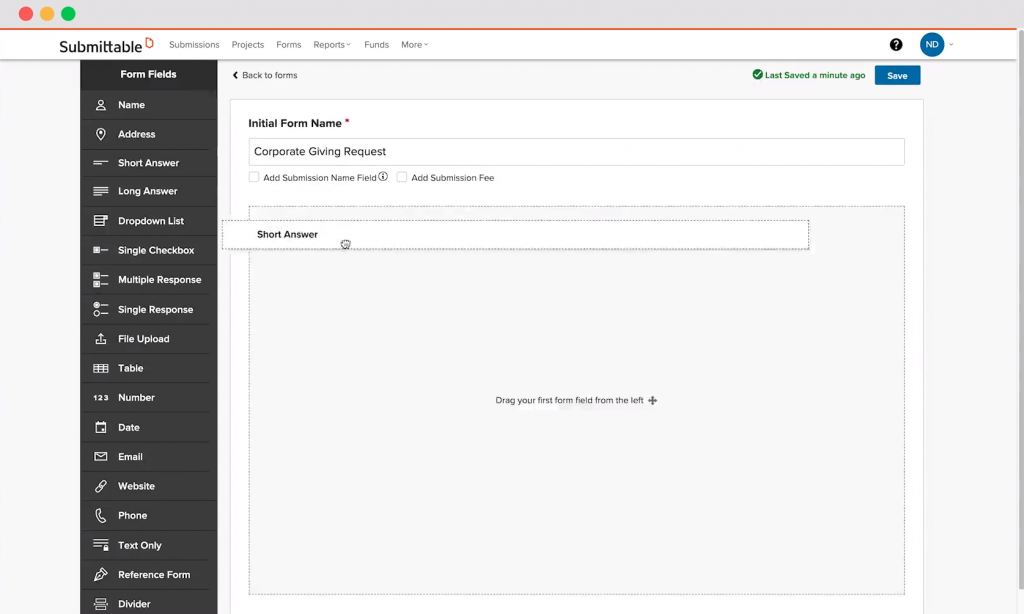
Submittable’s drag-and-drop interface
makes creating forms a breeze.
Smart review options and process
What good is a submissions management platform if it doesn’t
provide you with outstanding review functionalities? Submittable
lets you customize a review process that best meets your team’s
needs.
You can start by creating multiple review stages to manage your
team’s workflow more effectively. You can specify the kind of
review needed for each stage. Moreover, you can also simplify the
review process by letting reviewers vote yes, no, or maybe.
If you want more in-depth reviews, you can also create custom
forms and checklists that will guide your reviewers as to what kind
of feedback you need. You can add fields for numeric scoring or
qualitative feedback.
Furthermore, the submissions are readily available on
Submittable, so your reviewers no longer have to waste time and
bandwidth on downloading files.
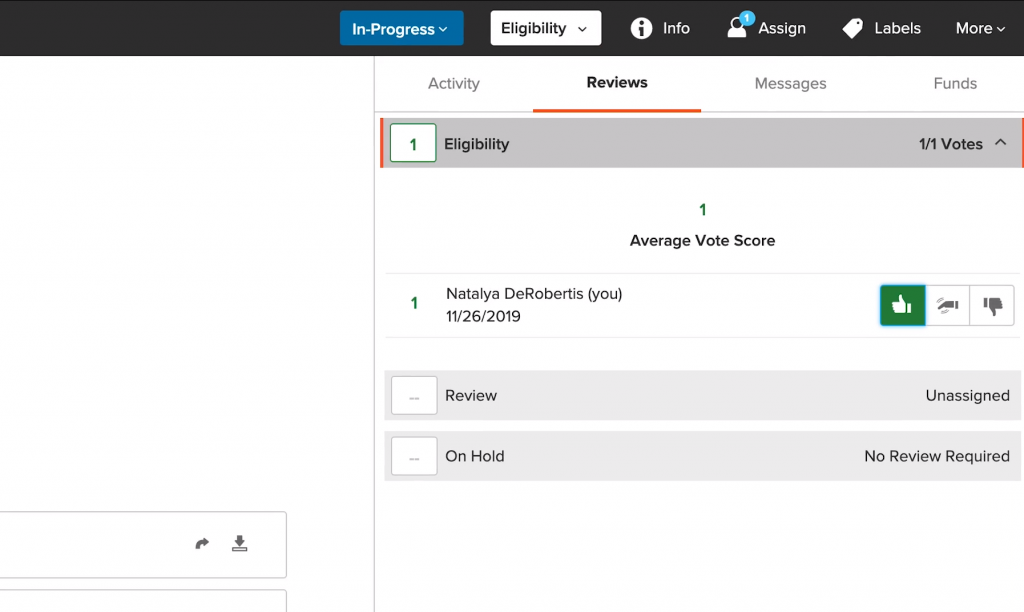
With Submittable, you can choose to
simplify the review process by allowing viewers to vote yes, no, or
maybe.
Dynamic customization and branding
options
Submittable comes with various customization options that let
you get creative in personalizing your team’s portal. By using CSS
codes and white labeling, you can make your Submittable dashboard
represent your organization. These customizations can also be
applied to your forms and submission pages. Additionally, you can
also activate language translation to ensure that your campaigns
are always accessible to your diverse audience.
Streamlined collaboration
Submittable serves as a platform where you can access all
submissions and communication from both your team members and
applicants. You can communicate with reviewers and submitters en
masse through templated messages. Of course, you can also pen
unique responses to accept or decline applications.
Submittable also lets you manually or automatically assign
submissions to your team of reviewers. You can also set up and send
reminders and notifications to prevent reviewers and submitters
from missing deadlines.
Take note, however, that the number of team members you can
register will vary depending on what Submittable pricing
plan[22] you choose.
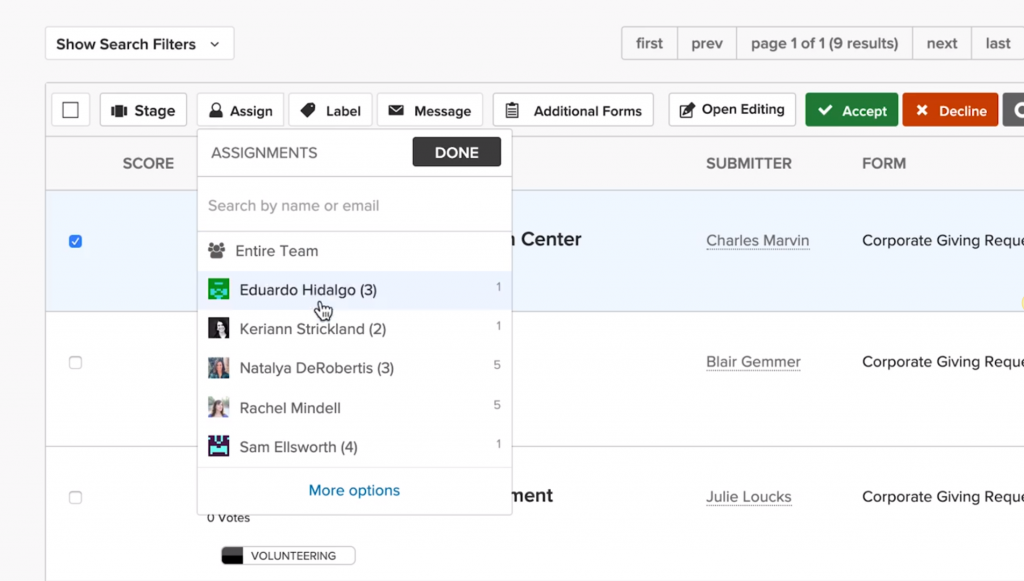
Submittable lets you set up assignments
manually or automatically.
Efficient payment processing
Need to collect submission or subscription fees to generate
revenue, solicit donations, or cover program costs? Submittable
supports secure and efficient payment collection methods to make it
easier for your applicants, donors, or customers to complete their
payment and submission.
Mobile compatibility
As a cloud-based platform, Submittable makes your forms
accessible to submitters using any device. Your registered team
members can also log onto the platform using their Android or iOS
devices. This way, they can take care of assignments and get
updates even while on the go.
Advanced reporting and tracking
Submittable produces various types of reports that allow you to
monitor the progress of campaigns from start to finish.
Submittable’s robust reporting tools help you track campaign and
submissions data so you can assess the impact of your
program.
The reports dashboard shows key data points throughout your
campaigns. You can also take advantage of advanced data reporting
tools by merging data from multiple forms. The funds reporting
feature, on the other hand, specifically lets you keep track of
funding received or paid through Submittable.
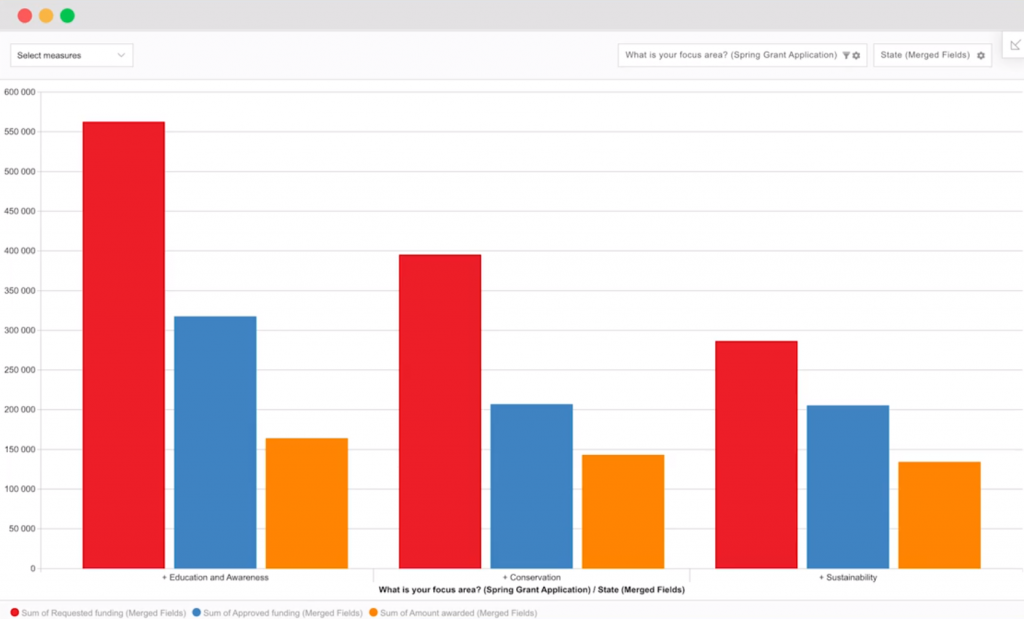
Submittable helps you assess the success
and impact of your campaigns with comprehensive reports and
analytics.
Seamless integrations
Submittable also supports integration with other business
applications. This facilitates better collaboration with other
departments, such as HR, finance, and marketing. Integrations also
help your team function more efficiently as most, if not all, of
the tools they need to do their job can already be found in one
platform. The programs you can integrate with Submittable include
Salesforce, Zapier, Slack, and Mailchimp.
Secure Single Sign-On
More commonly known as SSO, Single Sign-On allows users to sign
in to most of the applications they use using a single set of
credentials. With SSO, you can access your Submittable account
without having to manage and remember another set of login
details.
Unique permission levels
With the team permission levels feature, you have full control
as to which information your reviewers can access. This lets you
hide sensitive and confidential information about certain
submissions. As a result, anonymity is preserved, and bias is
prevented. Submittable features five unique permission levels.
Keep in mind, however, that the permission levels may limit a
user’s ability to tag other team members if they want to. Users may
also be restricted from viewing information that they think is
crucial to their work process.
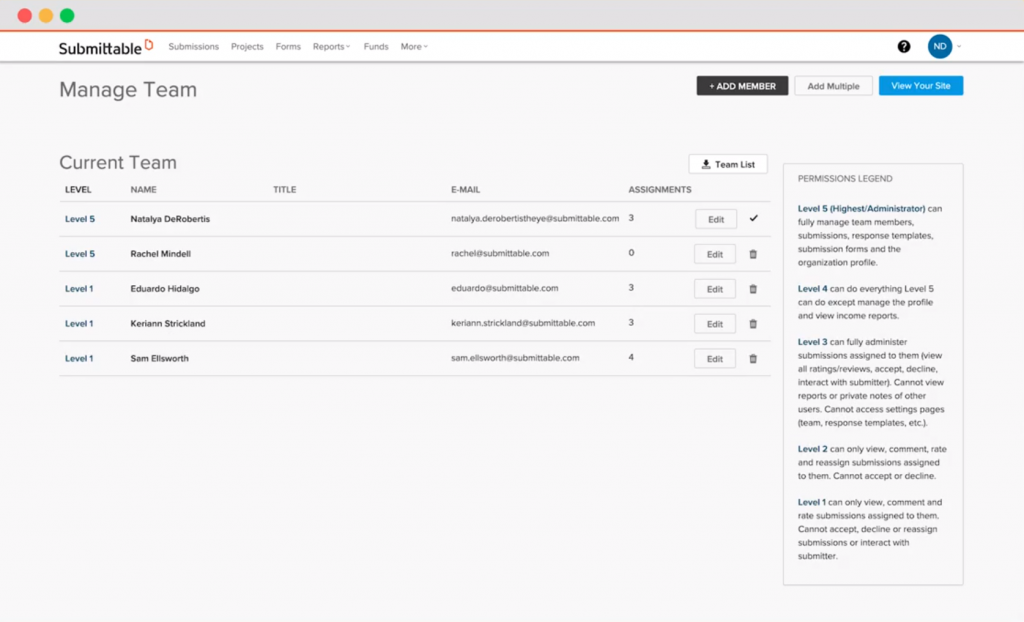
By assigning permission levels to your
reviewers, you can control which information they can access to
ensure anonymity and eliminate bias.
Is Submittable Right for You?
If you’re looking for the best ATS and submissions management
software on the market, then Submittable should definitely be on
your radar. It does a great job doing what you’d expect from such
software, from collection to review of submissions. However, what
sets it apart from the competition is how it provides a good set of
customization options. These options not only make forms and
campaigns more personalized but more comprehensive and effective as
well. You must take note that there are certain features not
available in the lower-priced Submittable plans, though.
Of course, the decision of whether to choose Submittable for
your organization will still depend on your unique requirements. It
will be in your best interest to look at alternative applicant tracking
software[23] to make sure that
you’re not missing out on other worthy solutions.

Read more https://financesonline.com/pros-cons-of-submittable/